
Billing
Manage your monoAdmin subscription and choose the right plan for your community.
Manage your community’s subscription and project limits directly from the Web Panel.
Current Plan
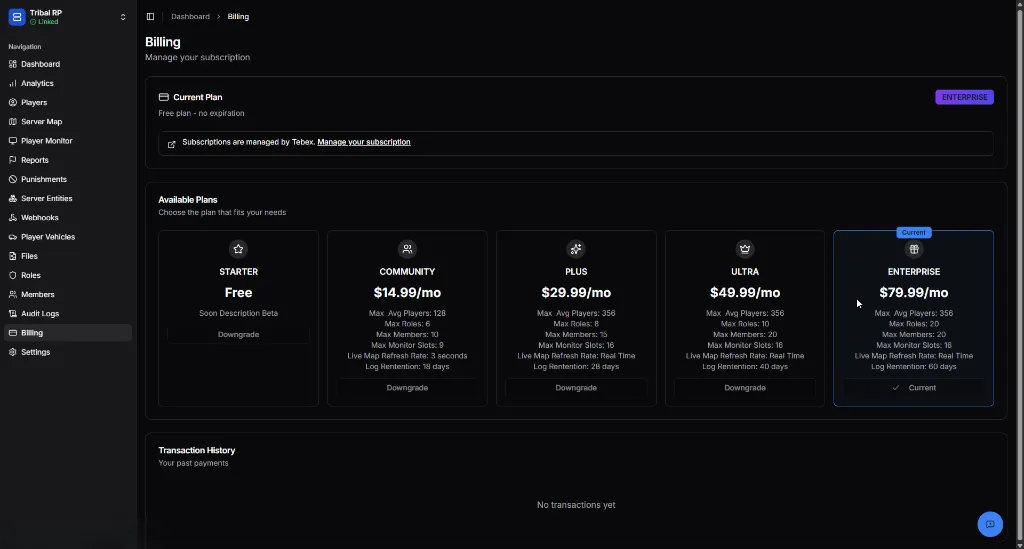
Section titled “Current Plan”The Billing overview shows your project’s active subscription status.
Managing Your Subscription
Section titled “Managing Your Subscription”monoAdmin uses Tebex for all payment processing. You can manage your subscription (upgrade, downgrade, or cancel) by clicking the Manage your subscription link in the Billing header, which will take you to the secure Tebex Checkout.
Available Plans
Section titled “Available Plans”Choose the plan that best fits your community’s size and needs.
| Feature | Starter | Community | Plus | Ultra | Enterprise |
|---|---|---|---|---|---|
| Price | Free | $14.99/mo | $29.99/mo | $49.99/mo | $79.99/mo |
| Max Concurrent Players | 64 | 128 | 356 | 512 | 1024 |
| Max Roles | 4 | 6 | 8 | 10 | 20 |
| Max Members | 5 | 10 | 15 | 20 | 20 |
| Max Monitor Slots | 4 | 8 | 16 | 16 | 16 |
| Live Map Rate | 5 seconds | 3 seconds | Real Time | Real Time | Real Time |
| Log Retention | 7 days | 18 days | 28 days | 40 days | 60 days |
Feature Explanations
Section titled “Feature Explanations”- Max Concurrent Players — The maximum number of players that can be active on your server simultaneously.
- Max Roles/Members — Limits on the number of staff members and roles you can create in the Roles system.
- Max Monitor Slots — The number of server monitoring slots available for tracking multiple servers.
- Live Map Refresh Rate — How frequently player positions update on the Server Map. Higher tiers offer true Real-Time updates.
- Log Retention — How long Webhook Logs and Audit Logs are kept before being cleared.
Claim a Purchase
Section titled “Claim a Purchase”If you purchased a subscription directly from the Tebex Store without selecting a project, you can link that purchase to your project using the Claim a Purchase button located in the top-right corner of the Available Plans section.
To claim your purchase:
- Click Claim a Purchase
- Enter your Transaction ID — found in your Tebex payment confirmation email (format:
tbx-xxxxxxxx-xxxx-xxxx-xxxx-xxxxxxxxxxxx) - Enter the Email Address you used at checkout
- Click Claim Purchase
The subscription will be applied to your current project immediately.
Transaction History
Section titled “Transaction History”Scroll to the bottom of the Billing page to view your Transaction History. This provides a record of all past payments, invoices, and plan changes for your project records.