
Audit Logs
Track all staff activities and administrative changes within your project.
Audit Logs provide a comprehensive, immutable record of every action taken by staff and system processes within your monoAdmin project.
Overview
Section titled “Overview”The Audit Logs page is essential for maintaining accountability and transparency in your community’s management. It allows you to trace exactly who performed an action, what that action was, and when it occurred.
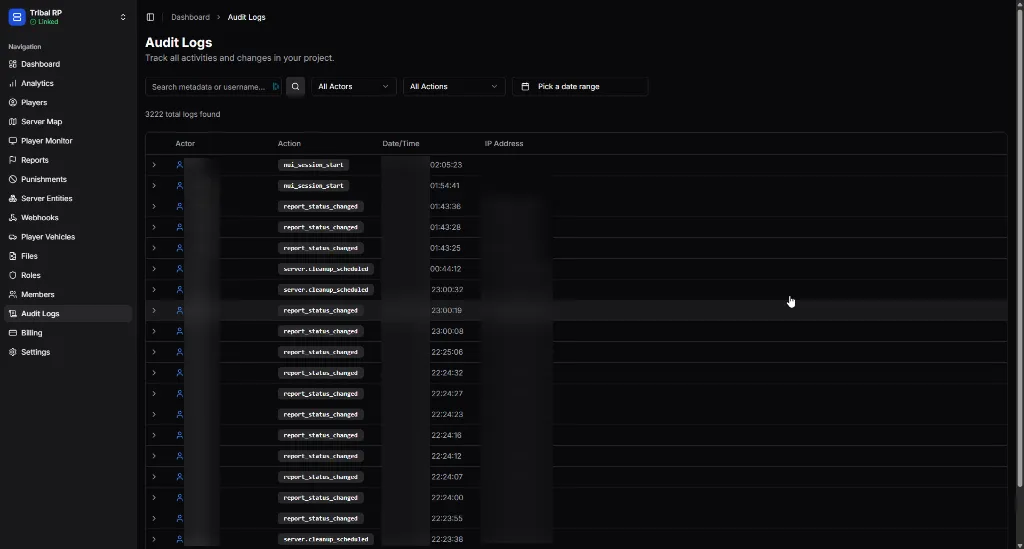
Filtering Logs
Section titled “Filtering Logs”Given the high volume of activity on a busy server, the Audit Logs page features powerful filtering tools to help you find precisely what you’re looking for.
| Filter Type | Description |
|---|---|
| Search Metadata | Search for specific strings within the log payload or usernames. |
| All Actors | Filter by a specific staff member or system process. |
| All Actions | Filter by the type of action (e.g., report_status_changed). |
| Date Range | View logs within a specific timeframe (Daily, Weekly, or Custom). |
Log Entry Details
Section titled “Log Entry Details”Each entry in the audit table provides high-level information at a glance:
- Actor — The staff member or system identity that initiated the action.
- Action — The specific operation performed (e.g., changing a ban, updating a role).
- Date/Time — The precise timestamp of the event.
- IP Address — The network address from which the staff member accessed the panel.
Viewing Full Payloads
Section titled “Viewing Full Payloads”Click the Expand (>) icon next to any log entry to view the complete JSON metadata for that action. This details the “Before” and “After” states of modified data, providing deep context for changes.
Common Action Types
Section titled “Common Action Types”You will frequently see the following actions in your logs:
nui_session_start— Logged when a staff member opens the In-Game Control Panel.report_status_changed— Logged when a Report is opened, closed, or updated.server.cleanup_scheduled— Logged when an automated or manual cleanup of server entities (vehicles, NPCs) is triggered.punishment.created/punishment.updated— Tracks all disciplinary actions.
Audit Logs are permanent records. They cannot be edited or deleted by staff members, ensuring a reliable audit trail for community owners.